
File Metadata Explained. What It Reveals and What Can Be Removed
Use the tool below to remove supported file metadata in your browser.
or drag and drop files anywhere here
How to Remove Supported File Metadata in 3 Steps
Follow these three steps. Each image shows only the control used in that step.
Step 1
Upload the file
Drop the file into the upload area or choose it from your device.
Open the tool
Step 2
Review the metadata
Check the detected supported file metadata and select the fields you want to remove.
Open the tool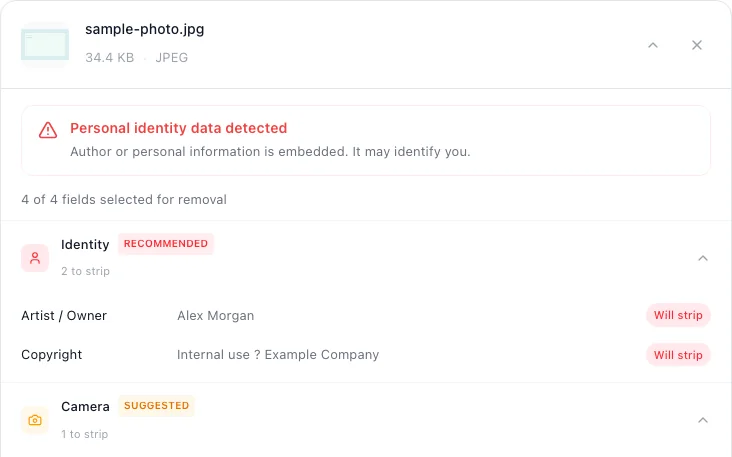
Step 3
Remove and download
Start the cleaner and download the new copy.
Open the tool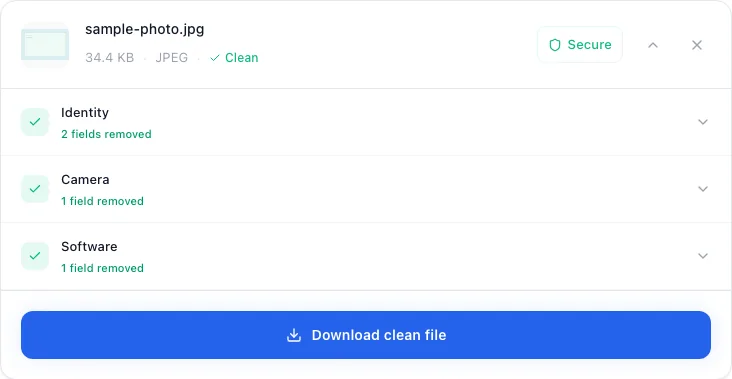


Supported File Metadata this tool can remove
Check the highest priority fields first.
- Author or account identityRemove first
- Creation and editing datesHigh priority
- Location and device detailsHigh priority
- Software and workflow historyReview
Supported File Metadata questions
Short answers about verification, file quality, and format limits.
Metadata is not one thing
“Metadata” is a convenient umbrella term, but the data is not stored in one universal layer. A JPEG may use EXIF, XMP, and IPTC structures. A PDF can have a document information dictionary as well as an XMP packet. An MP3 can carry ID3 frames, while an MP4 or MOV organizes information into boxes or atoms.
That difference matters because a tool can remove one structure and leave another intact. It is more accurate to ask which fields, in which container, are detected and rewritten than to ask whether a file has been made “metadata-free.” The CIPA EXIF specification, for example, describes a specific family of image metadata, not every possible non-pixel structure in an image.
Privacy-sensitive data and technical data are different
Privacy-sensitive metadata may include GPS coordinates, author names, device identifiers, timestamps, comments, copyright fields, or editing software. Those fields can add context a recipient did not need.
Technical properties such as image dimensions, codec names, sample rate, duration, or color information often remain because software needs them to render or play the file. Their presence does not automatically mean a cleaning operation failed. The practical goal is to reduce unwanted context while preserving a usable file.
A format-by-format metadata map
| File family | Common structures | Useful privacy review |
|---|---|---|
| JPEG / TIFF / RAW | EXIF, XMP, IPTC, ICC profiles | GPS, capture time, camera and lens identifiers, author and copyright |
| PNG / WebP / GIF | Text chunks, time chunks, EXIF/XMP chunks, comment and application extensions | Author, software, timestamps, comments, imported photo metadata |
| PDF / Office / ODF | Document properties, XMP, package XML, comments and revision structures | Author, company, last editor, dates, keywords, and separately, hidden content |
| Video | Container tags and boxes, stream descriptors | Creation time, location, device, title, author, comments, software |
| Audio | ID3, Vorbis Comments, MP4 atoms, RIFF chunks | Artist, title, comments, copyright, dates, account-linked identifiers |
For a closer look at the main image standard, read what EXIF data contains. If your immediate goal is action rather than background, use the format-specific workflows for photos, PDF files, video, or audio.
Metadata cleaning is not hidden-content sanitization
A PDF annotation, an Office tracked change, a spreadsheet's hidden worksheet, and a document author field can all reveal information, but they are not the same technical object. Clearing document properties does not inspect every place sensitive content may live.
Before sharing a sensitive Office file, use the application's own inspection workflow in addition to metadata cleaning. Microsoft's Document Inspector guidance explicitly treats revisions, comments, hidden content, and properties as separate categories. For PDFs, visually inspect annotations, attachments, layers, forms, and redaction results as a separate task.
Written and maintained by
metapeel Editorial TeamThe team that documents metapeel's browser-based metadata inspection and cleaning behavior against the current implementation and primary format references.