How to Remove EXIF Data from Photos — Step-by-Step Guide

metapeel Team·6 min read·May 31, 2026

What is EXIF Data?

EXIF (Exchangeable Image File Format) data is a standard that embeds detailed metadata directly into image files. Every time you take a photo with a digital camera or smartphone, the device silently writes a bundle of information into the file header. This data travels with the image wherever it goes — through messaging apps, social media uploads, email attachments, and cloud storage.

The EXIF specification was originally created by the Japan Electronic Industries Development Association in the late 1990s to help photographers and imaging software manage technical details about how a photo was captured. While useful for photography professionals, this same data creates significant privacy concerns for everyday users who share photos online without realizing what personal information they are revealing.

EXIF data is stored inside the binary file itself, not as a separate layer. That means it persists through copying, downloading, and forwarding — unless someone explicitly strips it out. Most social media platforms do remove EXIF data from uploaded photos, but many messaging apps, email clients, and file-sharing services pass it along untouched.

Why You Should Remove EXIF Data

Leaving EXIF data intact in your photos exposes you to several real privacy risks that most people never consider. When you share a photo with embedded metadata, you are sharing far more than just the image.

  • Location tracking: GPS-enabled cameras and smartphones embed precise latitude and longitude coordinates into every photo. Anyone with access to the file can pinpoint exactly where the picture was taken — your home, workplace, school, or any location you visited. A series of photos can reveal your daily routine and frequent locations.
  • Device identification: EXIF fields record your camera or phone model, unique serial numbers, and software version. This information can be used to build a fingerprint of your devices, linking multiple photos back to the same person even across different platforms.
  • Timestamp analysis: Exact capture dates and times let anyone reconstruct a timeline of your activities. Combined with location data, this creates a detailed log of your movements and behavior patterns.

For journalists, activists, victims of stalking, or anyone concerned about digital privacy, these risks are especially serious. But even casual users benefit from stripping metadata before sharing photos publicly or sending them to people they do not know well.

What Metadata Your Photos Contain

The amount of information packed into a typical photo file is surprisingly extensive. Here are the most common EXIF fields found in digital photographs:

  • Camera make and model — The manufacturer and exact model of the device used to capture the image.
  • GPS coordinates — Latitude, longitude, and altitude where the photo was taken.
  • Date and time — Precise timestamp of when the shutter was pressed, often more accurate than file system dates.
  • Lens information — Focal length, aperture, and sometimes the specific lens attached to the camera.
  • Camera settings — ISO sensitivity, shutter speed, exposure compensation, white balance, and flash mode.
  • Software information — The operating system, editing software, or apps used to process the image.
  • Embedded thumbnails — A small preview image stored inside the file, which sometimes differs from the visible photo after cropping.
  • Serial numbers — Internal camera body serial numbers that can uniquely identify your device.

A single JPEG from an iPhone can contain over 100 individual metadata fields. RAW files from DSLR cameras often contain even more, including proprietary manufacturer data that standard EXIF viewers cannot fully decode.

How to Remove EXIF Data from Photos

metapeel makes stripping EXIF data from your photos fast, free, and completely private. Everything runs locally in your browser using WebAssembly — your files never leave your device.

Step 1: Upload Your Photo

Drag and drop your image file onto the metapeel tool, or click to browse and select a file from your device. metapeel supports JPEG, PNG, WebP, TIFF, HEIC, and most RAW formats. The file is read entirely in your browser and never uploaded to any server.

Step 2: Review the Metadata

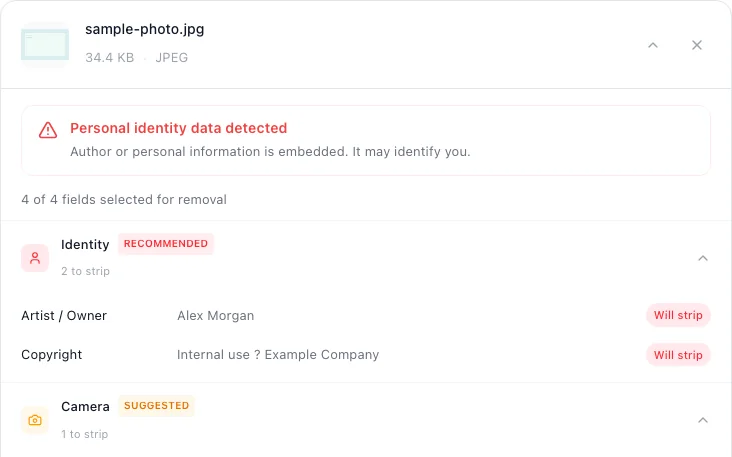
metapeel instantly parses and displays every metadata field found in your file. You will see camera information, GPS coordinates, timestamps, software tags, and any other embedded data. Review everything before deciding what to remove.

Step 3: Clean and Download

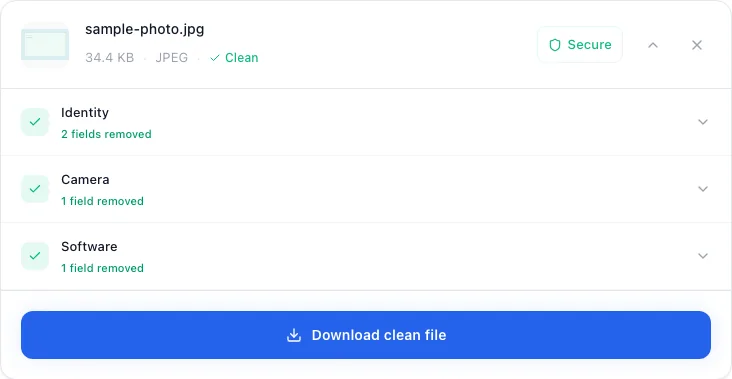
Click the clean button to strip all metadata from your photo. metapeel generates a new file with all EXIF, IPTC, and XMP data removed, leaving only the image pixels intact. Download the clean file and share it with confidence.

The entire process takes just a few seconds for typical photos. Since no data is transmitted over the internet, it works even when you are offline, and there are no file size limits or daily usage caps.

How to Verify Metadata Was Removed

After cleaning your photo, you can verify that all metadata was successfully removed by re-uploading the cleaned file back into metapeel. The tool will scan the file again and confirm that no EXIF, IPTC, or XMP fields remain.

Alternatively, you can check metadata on your operating system. On Windows, right-click the file and select Properties, then navigate to the Details tab. On macOS, open the file in Preview and use the Inspector (Command+I) to view metadata. A properly cleaned file will show blank or generic values for all fields.

This double-check step is especially important for sensitive situations — such as preparing photos for legal submissions, anonymous reporting, or sharing with strangers online. Taking a few extra seconds to verify gives you certainty that no private information is leaking through your images.

Additional Privacy Tips for Photos

Removing EXIF data is one of the most important steps you can take, but comprehensive photo privacy involves a few additional considerations:

  • Disable geotagging — Turn off location services for your camera app in your phone settings. This prevents GPS data from being written into photos in the first place.
  • Be mindful of reflections and backgrounds — EXIF data is not the only way photos can reveal personal information. Street signs, house numbers, landmarks, and reflections in mirrors or windows can all disclose your location.
  • Strip metadata from screenshots too — Screenshots often contain timestamps and device information in their metadata. Run them through metapeel before sharing.
  • Check before batch sharing — If you are sharing an entire album or folder, make sure every single file has been cleaned. It only takes one overlooked photo to compromise your privacy.
  • Use end-to-end encrypted sharing — Even after stripping metadata, use secure messaging platforms when sharing sensitive photos to prevent interception during transmission.

Building these habits into your workflow ensures consistent privacy protection without requiring extra effort. metapeel handles the technical side — you just need to remember to use it before sharing.

Remove EXIF Data from Your Photos Now

Free, private, and runs entirely in your browser.

Clean Your Photos